Hide sensitive screen contents with a toggleable pixelation effect in OBS, controlled by a Streamer.bot action.
Setup Guide
Filter downloaden und installieren
Composite Blur mit Dank an FiniteSingularity
Add the pixelation filter
Add a Composite Blur filter to your capture source and name it Screen Protection. Select Pixelate, choose Hexagonal and use a pixel size around 10. Match the remaining settings to the screenshot.
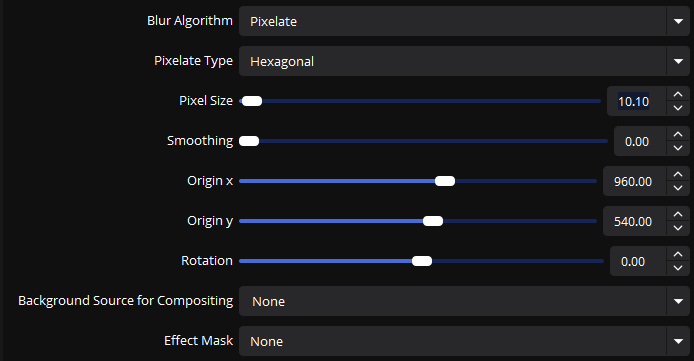
Composite BlurScreen Protection filter settings Create the on and off animations
Add two Move Value filters. Both target Screen Protection → Pixel Size using Single Setting. Use 10 for Protection On and 1 for Protection Off. Enable Custom Duration and set it to 1000 ms; leave Start Delay at 0 ms.
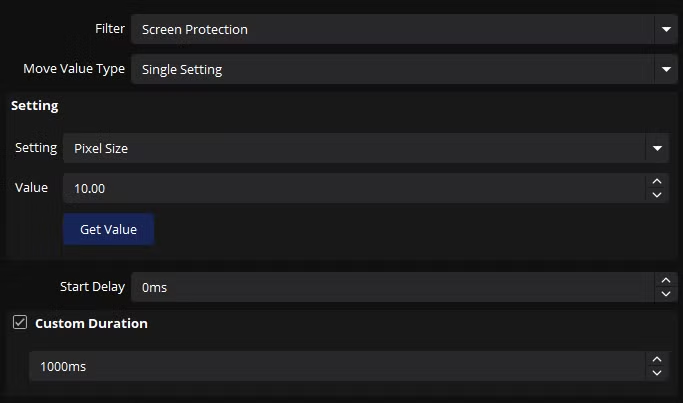
Protection OnPixel Size 10 · 1000 ms 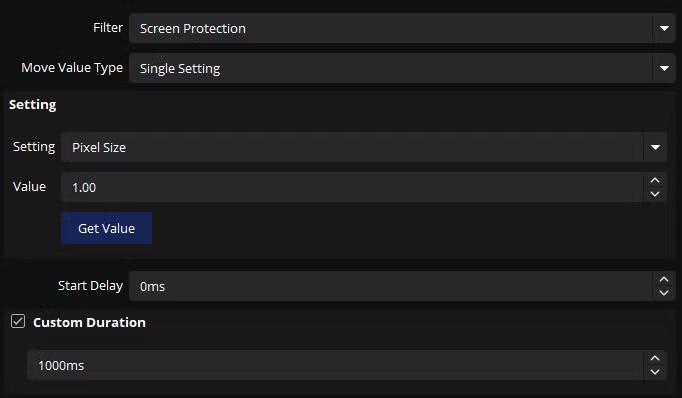
Protection OffPixel Size 1 · 1000 ms Import the Streamer.bot action
Copy this import code and paste it into the Streamer.bot import dialog.
Match your OBS names
Adjust the source and filter in the OBS Raw sub-action. Match every scene, source and filter name in the C# code to your OBS setup, including spelling and capitalization. String values need quotation marks.
Use your actual source names. In German OBS, Display Capture is called Bildschirmaufnahme.Toggle and verify
Connect Streamer.bot to OBS, assign your desired trigger and test both states. Check the actual OBS output to ensure the protected area becomes unreadable. The demonstration above is only a preview and does not capture or protect your desktop.
Write a review